
Want to know if your Google Ads or Facebook campaigns are actually bringing in revenue? Here is a simple, plain-English breakdown of your Estimatty Marketing Dashboard.
Introduction
Running ads and generating online leads can feel like throwing money into a black hole. You know people are visiting your website and submitting estimate requests, but how do you know which ad campaigns actually produce paid bookings and which ones are just wasting your budget on spam?
We designed the Marketing & Campaign Analytics Dashboard to answer those questions instantly in plain language—no complex marketing jargon required.
Here is a simple guide to understanding your marketing numbers and making smarter decisions for your business.
The Executive KPI Cards: Your Business Snapshot

When you open the dashboard, the top row gives you an immediate overview of your entire acquisition pipeline:
- Total Leads & Status Breakdown
- What it shows: Every lead inquiry that came into your system.
- Why it matters: Below the total number, you will see a status pill breakdown (inbox, archived, spam/blacklisted). This tells you if your marketing efforts are attracting genuine potential customers or just unwanted sales calls and spam.
- Paid Leads & Paid Percentage (%)
- What it shows: How many of your total leads were generated specifically through paid advertising (Google Ads, Facebook Ads, Pay-Per-Click) vs. organic search.
- Why it matters: Seeing your Paid Percentage helps you evaluate how dependent your business is on paid advertising versus natural word-of-mouth and organic search.
- Pipeline Value & Paid Revenue
- What it shows: The total estimated dollar value of all service quotes created for these leads.
- Why it matters: It highlights how much potential revenue is currently in your pipeline—and exactly how much of that pipeline value was generated by your paid campaigns.
- Booked Jobs
- What it shows: The total number of leads who converted into confirmed/booked cleaning appointments.
- Why it matters: Views and clicks don’t pay the bills; bookings do! This metric proves the true ROI (Return on Investment) of your ad spend.
The Campaign Breakdown Table: Finding Your Best Lead Sources
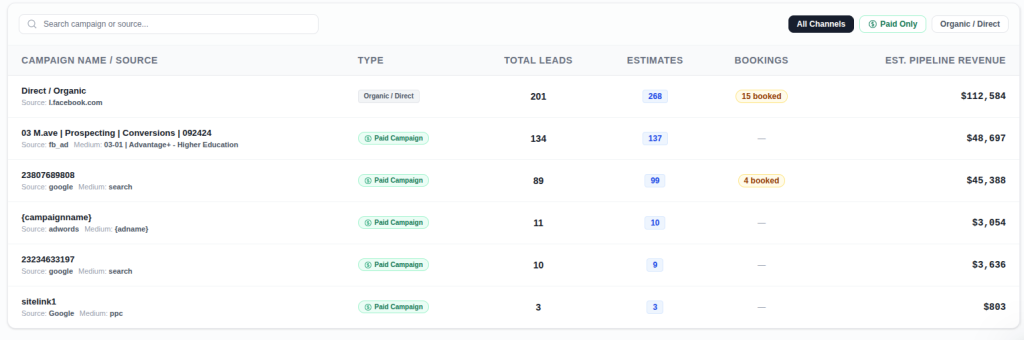
Scroll down to the table to see your performance broken down campaign-by-campaign:
- Campaign Name / Source: Identifies where the lead came from (e.g.,
summer_promo_2026,facebook_retargeting, orDirect / Organic). - Type: Distinguishes between Paid Campaigns (where you spent ad dollars) and Organic / Direct traffic.
- Leads & Status Pill: Displays total leads for that campaign alongside a status count (how many are active in your inbox, how many were archived, and how many were flagged as spam).
- Estimates & Bookings: Shows how many formal estimates were generated and how many turned into completed bookings.
- Est. Pipeline Revenue: The total monetary value of jobs linked to that specific campaign.
How to Use This Dashboard to Grow Your Business
- Spot High-Spam Campaigns Fast: If a paid campaign shows a high number of spam / blacklisted leads, pause or adjust that ad targeting immediately—you are paying for low-quality clicks.
- Double Down on High Converters: If a campaign shows 5+ booked jobs and high pipeline revenue, consider increasing your ad budget on that channel.
- Value Organic Growth: If
Direct / Organicaccounts for most of your booked jobs, your local SEO and customer referrals are performing strongly!
2. Frequently Asked Questions (FAQ)
Q1: What counts as a “Paid Lead”?
A: A lead is automatically classified as a Paid Lead if they arrived on your website via a paid advertising link—such as Google Search Ads (CPC/PPC), Facebook or Instagram Ads, or any URL containing campaign tracking tags (e.g., utm_medium=cpc).
Q2: What is the difference between “Direct / Organic” and a named campaign?
A:
- Direct / Organic: Visitors who found your website naturally through Google Search, typed your web address directly, or clicked a link from a partner directory without paid ad tracking.
- Named Campaigns: Visitors who clicked on a specific promotional link or ad (e.g.,
summer_promo_2026).
Q3: Why does my lead count show “inbox”, “archived”, and “spam”?
A: Not all leads turn into customers.
- Inbox: Active, valid leads currently being followed up or quoted.
- Archived: Past leads or lost opportunities that have been safely filed away.
- Spam / Blacklisted: Phone numbers or emails flagged as telemarketers, bots, or outside service areas.
Tracking this breakdown ensures you don’t judge an ad campaign purely on lead volume if half of those leads were spam!
Q4: How is “Pipeline Revenue” calculated?
A: Pipeline Revenue is the sum of all instant estimate prices and service quotes created for leads acquired through that campaign. It represents the potential value of the work requested.
Q5: What makes a lead count as a “Booked Job”?
A: A lead counts as booked when they complete the booking funnel (selecting a date/time slot and submitting property details) or when their status is updated to Booked.
Q7: Can Estimatty show my marketing campaign conversion rates and ROI?
A: Yes! Estimatty automatically tracks every lead from the moment they click your ad or visit your website to the exact moment they request an estimate and book a job. In your Marketing Dashboard (/leads/campaigns), Estimatty links each campaign directly to your actual bookings and estimated pipeline revenue. This allows you to immediately see which ad campaigns are converting into real, paying customers and generating positive ROI.
Q8: How does Estimatty know which marketing campaign brought in a lead?
A: Estimatty automatically captures campaign parameters (such as utm_source, utm_medium, utm_campaign, and website referrers) when a customer fills out an estimate request or interacts with your booking widget. It securely attaches this attribution data to the lead record, so you can track conversion rates per campaign without any extra technical setup.
Q9: Can I see which paid campaigns are producing actual booked revenue versus spam?
A: Absolutely. Unlike standard ad analytics platforms (like Google Ads or Facebook Ads) that only show clicks or form fills, Estimatty separates your lead statuses into Inbox, Archived, and Spam. This means you can see your true conversion rate from ad click to booked job—ensuring you never waste money on campaigns that generate high click volume but zero actual bookings.